
Storm Prediction Center Widget1.8 - Google Play
You'll be able to see results in few seconds.
Publisher Description

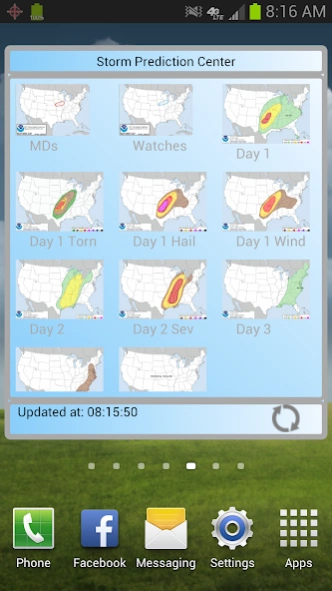
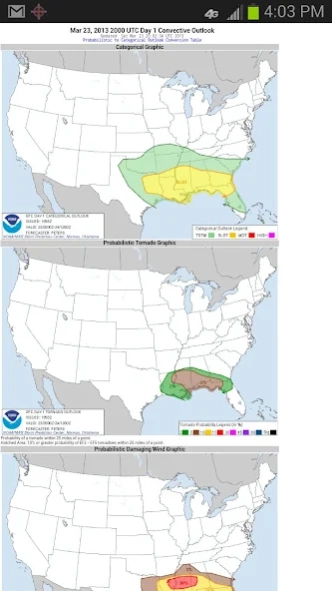
Quick access to all the favorite SPC sites on your homescreen.
Recent Android changes are keeping widgets from updating. You must turn off power saving features in Settings to keep this and other widgets from not working.
Keep up to date with the latest Severe Weather Outlooks from the Storm Prediction Center. See the latest Mesoscale Discussions, Watches, Day 1, 2, 3, 4 - 8 Day Outlooks and Storm Reports at a glance on this Home Screen Widget.
Press on any image to go the SPC webpage for more details.
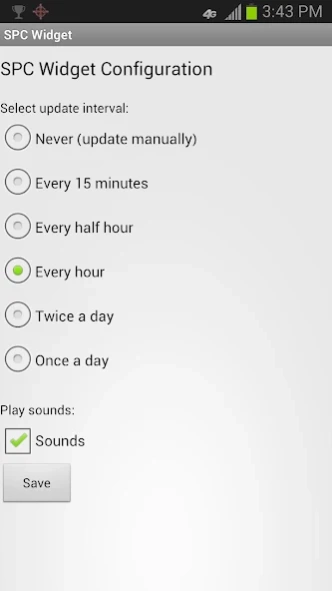
Settings include options to update every 15 minutes, 30 minutes, every hour, twice a day or once a day. Hit the Refresh button on the widget at anytime to see an instant update of the most current information. Play a sound at every update (veteran chasers will recognize this sound!) or uncheck sounds.
Instructions for install:
1) Go to your apps button (On KitKat and greater after long press on the homescreen you'll see widgets at the bottom of the screen.)
2) Select the Widgets tab. Long press on the SPC Widget (light blue background).
3) Drag to the area you want it on your homescreen.
4) See the config screen and choose your settings for update frequency and sounds.
5) Save and then see it on the screen.
6) Long press again to resize.
7) Long press and move to trash can to delete.
8) Repeat 1) - 6) to add again.
To reconfigure:
To get back to the config screen you have to delete your widget from the screen by dragging it to the trashcan then install a new one. Then you will see the config screen again and can set a new update time or disable the sound on the new one.
On June 21, 2018 the widget stopped updating it's images. Version 1.7 now fixes this problem and shows the images again.
(c)2018 Apexice All Rights Reserved
About Storm Prediction Center Widget
The company that develops Storm Prediction Center Widget is APEXICE. The latest version released by its developer is 1.8.
To install Storm Prediction Center Widget on your Android device, just click the green Continue To App button above to start the installation process. The app is listed on our website since 2020-04-25 and was downloaded 0 times. We have already checked if the download link is safe, however for your own protection we recommend that you scan the downloaded app with your antivirus. Your antivirus may detect the Storm Prediction Center Widget as malware as malware if the download link to com.apexice.android.spcwidget is broken.
How to install Storm Prediction Center Widget on your Android device:
- Click on the Continue To App button on our website. This will redirect you to Google Play.
- Once the Storm Prediction Center Widget is shown in the Google Play listing of your Android device, you can start its download and installation. Tap on the Install button located below the search bar and to the right of the app icon.
- A pop-up window with the permissions required by Storm Prediction Center Widget will be shown. Click on Accept to continue the process.
- Storm Prediction Center Widget will be downloaded onto your device, displaying a progress. Once the download completes, the installation will start and you'll get a notification after the installation is finished.
Program Details
System requirements
Download information
Pricing
Version History
version 1.8
posted on 2020-04-25
Updated to support Android 28. Added new Day 2 Tornado Probability image.
version 1.7
posted on 2018-06-25
Fixes bug that widget images were not being shown.
version 1.6
posted on 2015-01-05
Fixed bug that occasionally caused crashing when switching wifi.
version 1.2
posted on 2013-04-17
Several fixes and updates
Disclaimer
Official Google Play Link
We do not host Storm Prediction Center Widget on our servers. We did not scan it for viruses, adware, spyware or other type of malware. This app is hosted by Google and passed their terms and conditions to be listed there. We recommend caution when installing it.
The Google Play link for Storm Prediction Center Widget is provided to you by apps112.com without any warranties, representations or guarantees of any kind, so access it at your own risk.
If you have questions regarding this particular app contact the publisher directly. For questions about the functionalities of apps112.com contact us.
